Grid it. Draw it. Track it. Sell it.
Drawing Grid is a grid drawing and tracing app, and the all-in-one studio for artists. Overlay a precise grid on any reference, trace it in AR or right on your screen, manage every piece as a project, track your time and progress, and publish a public gallery to share and sell your work.


Free to download · Works with your own photos · Syncs across your devices
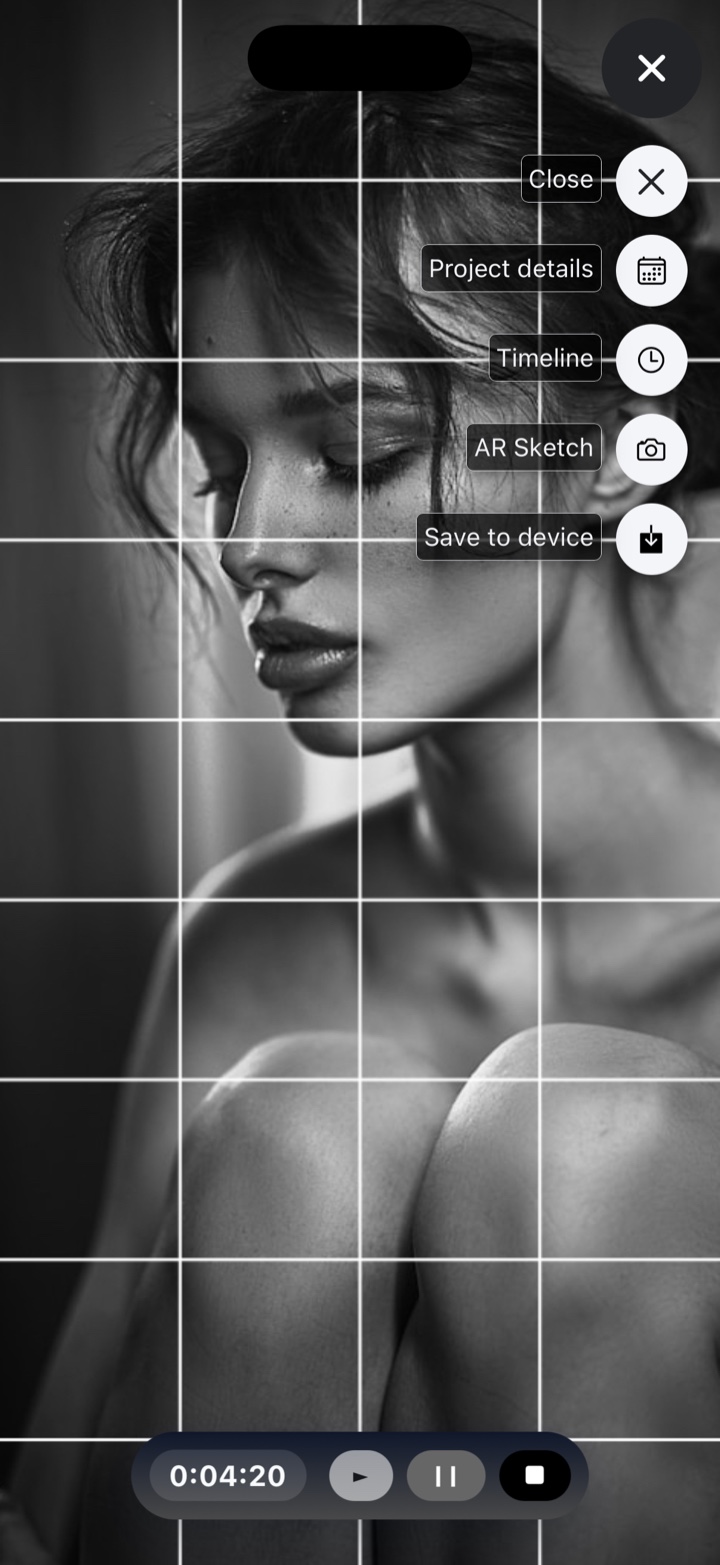
Everything an artist needs, in one place
From your first gridded or traced reference to a finished, published piece — Drawing Grid keeps your drawing tools, projects and gallery together.
Precision drawing grid
Overlay a fully adjustable grid on any photo — set columns, rows, line color and width. Crop, zoom and drag in full screen, apply filters, then export.
Project management
Turn every artwork into a project with its own title, description and status, so your work-in-progress and finished pieces stay organised in one library.
Automatic time tracking
Log the hours you put into each piece automatically. Know exactly how long your art takes — perfect for pricing commissions and tracking progress.
Progress timelines
Document each artwork's journey with a visual timeline of photos and notes, from blank canvas to finished piece. Look back on how far you've come.
AI title assist
Stuck for a name? Let AI suggest titles for your project in a tap, then pick the one you like best — all within your monthly token allowance.
Cloud sync & storage
Create an account and your projects, timelines and gallery sync securely across your devices, so your studio is always with you.
Trace in AR, or right on your screen
Every reference in Drawing Grid can be traced two ways. Work on paper with your camera, or work on the device itself — whichever suits the piece.
Trace onto real paper
Point your camera at your paper or canvas and the reference locks in place over it. Move around and it stays anchored, so you can trace what you see through the screen.
- Reference stays pinned to your surface as you draw
- Scale, rotate and reposition to fit your paper
- Adjust opacity so your own lines stay visible
Trace on your device
Draw straight over the reference in the app with a finger or stylus — no paper, no camera. Ideal for quick studies, warm-ups and working on the move.
- Trace with finger or stylus on the canvas
- Pinch to zoom and pan into fine detail
- Tune reference opacity, then export your tracing
Prefer to draw freehand? The adjustable grid works alongside both tracing modes.
Show your work. Sell your work.
Publish a beautiful public gallery at your own URL — no website required. Choose a theme, add a profile and cover image, and let anyone discover your art.
- Your own gallery URL. Share one link to your whole portfolio across social, email and your bio.
- List and sell pieces. Add a price to each item and mark it sold when it goes — keep your collection up to date.
- Themes that fit your style. Pick a look for your gallery.
From reference to finished piece
A simple flow that takes you from a photo to a published, sellable artwork.
Grid or trace it
Load any photo, then draw square by square with the grid, trace it onto paper in AR, or trace it on screen.
Track your progress
Save it as a project, let the app log your hours, and build a timeline as your piece grows.
Publish & sell
Add finished work to your public gallery, set a price, and share your URL with the world.
Questions, answered
What is Drawing Grid?
Drawing Grid is an all-in-one app for artists. At its heart is a precise, adjustable grid you can overlay on any reference photo, plus two tracing modes — AR tracing onto real paper, and on-screen tracing with your finger or stylus. Around that it adds project management, automatic time tracking, progress timelines, AI title suggestions, cloud sync, and a public gallery where you can share and sell your work.
What's the difference between AR and on-screen tracing?
AR tracing uses your camera: point the device at your paper or canvas and the reference is anchored over it, so you trace onto the real surface while looking through the screen. On-screen tracing keeps everything on the device — you trace over the reference directly in the app with a finger or stylus. Both work with the same references and projects, so you can pick whichever suits the piece.
Do I need a special device for AR tracing?
AR tracing relies on your device's built-in AR support — ARKit on iPhone and iPad, ARCore on Android — so it's available wherever your device supports those. If yours doesn't, on-screen tracing and the drawing grid still work exactly as normal.
Is it free?
Yes — Drawing Grid is free to download and start using on iOS and Android. Optional in-app purchases and subscriptions unlock cloud storage and AI token allowances etc.
Do I need an account?
You can use the core drawing-grid tools without an account. Creating an account is necessary for cloud sync across your devices, projects and timelines, AI features, and your public gallery.
What is the public gallery?
It's a portfolio page published at your own URL segment that anyone can view. You choose a theme, add a profile and cover image, and list your pieces — each with an optional price and a "sold" status. Drawing Grid provides the gallery as a publishing and display tool; you handle any sale directly with your buyer.
Can it track how long my art takes?
Yes. Each project can log your hours automatically, and you can document your progress with a visual timeline of images and notes from start to finish.
What are the AI features?
Drawing Grid can suggest titles for your projects using AI — just tap to generate options and pick your favourite. AI use draws from a monthly token allowance shown in Settings.
Which devices are supported?
Drawing Grid runs on iPhone and iPad via the App Store, and on Android phones and tablets via Google Play. Your work syncs across them when you're signed in.
Your whole studio, in one free app
Download Drawing Grid and take every piece from first grid or trace to final sale.